| Author |
Message |
Michel_K17
Moderator Group


Forum Administrator
Joined: 25 Jan 03
Posts: 1673
|
   Topic: PDF reDirect Pro v2.5.2 Official Release Topic: PDF reDirect Pro v2.5.2 Official Release
Posted: 06 Jun 10 at 4:18PM |
PDF reDirect Professional v2.5.2 is
now available (20 Nov 2010) for
download. This version is officially released.
- The upgrade from v2.5.0 to v2.5.2 is [HERE] (2.2MB)
- The full v2.5.2 installation program is [HERE] (7.1 MB)
- Notes:
- You
can use this installation program to upgrade your existing installation
(ie, no need to remove the old version first).
- The
installation program, and all files included have been
scanned by a virus checker. The report is shown in the next post
WHAT's NEW with v2.5.2 (since v2.5.0)
The biggest news is (by customer request) the conversion of the Save button into a multi-function button where you can change what the button is used for. 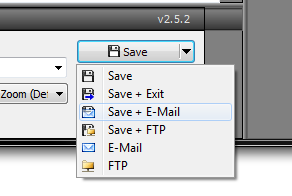 Here is the full list of changes:
- NEW: User can now e-mail or FTP directly from the Main Save Button.
- FIXED: "Invalid Treenode" error when opening a PDF which had page 1 extracted from the original PDF.
- FIXED: Bug that showed an error message when Command Line contained a filename exactly 3 letters long.
- FIXED: Minor typo in French language file.
- FIXED: Upgrade not running automatically after download is completed.
- IMPROVED: Updated the Portuguese-BR language file (thanks to Luciano K).
- IMPROVED: Made default the "Overwrite Existing File (Give Warning)" setting for new installations.
- DOCUMENTATION: Added instructions for IT Administrators for network/server installation.
- DOCUMENTATION: Mentioned that silent "/S" install switch must be capitalized instructions in the help file.
WHAT's NEW with v2.5.0 (since v2.2.8)
Actually, there have been quite a few changes. Here are the highlights.
Please see the next posts for the full list. - New user
interface (much cleaner for the Pro version)
- Completely re-worked the FTP and e-mail features so that it is more logical and easier to use.
- Added a dropdown to access recently created PDF files so that it's easier to navigate to it's folder
- Added the
ability to specify the startup page of the PDF
- Added quick
access (basic and advanced) to the printer properties
- Added support for unicode (for
languages that need this)
- Added the ability to create your own
custom page sizes
- Added stamp transparency and outline options
- Added Explorer style context menus (ie you can now right-click on files)
- Added the ability to view files as thumbnails in addition to a list
- Added newer 128 bit AES security encryption
- Added dropdowns for metadata so that you do not need to retype recently used text
- Added support for Adobe Distiller v8 and v9 conversion engine
- Added the option to copy the path of the newly created PDF file into the clipboard (so that it's easier to add the PDF to an e-mail in Outlook for example).
- Added the option to minimize to the systray
- Added Batch Printer sharing options
- Added <UID> and <PCID> codes to the automatic batch printer naming so that you can have the name of the user added to the filename created.
COMPATIBILITY
- Compatible and tested with Windows 2000, XP, Vista and 7
- It
is compatible with 32 and 64 bit versions of Windows
- Note:
this version is not compatible with Windows NT, 95, 98SE, or ME. Please
continue using the old versions for those.
|
|
Michel Korwin-Szymanowski
EXP Systems LLC
|
 IP Logged IP Logged |
|
Michel_K17
Moderator Group
Forum Administrator
Joined: 25 Jan 03
Posts: 1673
|
Posted: 06 Jun 10 at 4:21PM |
VIRUS CHECK LOG OF ALL DOWNLOADS
Avira AntiVir Personal
Scanning for 3070854 virus strains and unwanted programs.
Start of the scan: Saturday, November 20, 2010 17:15
Begin scan in 'D:\EXP\Products\PDF_Redirect_Pro\Installation Files\v25002\Files2Install'
The scan has been done completely.
4 Scanned directories
320 Files were scanned
0 Viruses and/or unwanted programs were found
0 Files were classified as suspicious
0 files were deleted
0 Viruses and unwanted programs were repaired
0 Files were moved to quarantine
0 Files were renamed
0 Files cannot be scanned
320 Files not concerned
1 Archives were scanned
0 Warnings
0 Notes
|
|
Michel Korwin-Szymanowski
EXP Systems LLC
|
|
IP Logged |
|
Michel_K17
Moderator Group
Forum Administrator
Joined: 25 Jan 03
Posts: 1673
|
Posted: 06 Jun 10 at 4:36PM |
CHANGES FROM v2.2.8 to v2.5.0NEW- Added Swedish as another supported language
- Added Hungarian (Magyar) Translation
- Added option to place Path and Filename into the clipboard when PDF is saved (ie use it to paste into an e-mail)
- Added ability to specify the page to be displayed when the PDF is opened
- Added support for super-secure 128-bit AES encryption option
- Added Grayscale Colorspace option (customer request). Note: it does NOT convert objects or images to gray.
- Added Japanese paper sizes
- Added all "B" paper sizes such as B4, B5, etc (B0 to B10).
- Added support for Network shared Batch PDF printers
- Added support for sharing Batch Printers for other users on a PC.
- Added ability to create custom paper sizes
- Added "Force to 0 degrees" Page rotation
- Added full access to Explorer context menu in the "Files" list
- Added thumbnail or list view of PDFs in the "Files" list
- Added ability to specify individual settings for each printer output file in the Merge List.
- Added ability to type or paste a path in the filename box
- Added ability to overwrite path destination of Printer INI file for ActiveX component.
- Added "Fit Two Pages" Page View Style Option.
- Added outlined Text Stamp Option
- Workaround for IT Administrators that run PDF reDirect under the ASP.NET or System Accounts.
- Batch Printers can now use <FILENAME>, <PCID> (PC Computer Name) and <UID> (Windows Login Name) tags in the e-mail subject and body text and Filename text
- Added "transparency" and "outline" support to stamps.
IMPROVED- Modern user interface
- Display PDF properties popup when placing mouse over a PDF file
- Program Header is much smaller, less obstrusive
- FTP and E-mail commands moved to the "Files" command bar
- Removed the obtrusive "Mode Bar"
- Recently accessed paths now works with unicode paths (Japanese, Chinese, Hebrew, etc.)
- Saving preferences/settings is now 4x faster
- E-Mail Address List increased from 25 to 60 addresses
- Code stability by using late binding code for PDF Distiller since most users do not use it.
- Can now press "F5" to refresh the Files List Box if it does not update automatically.
- shutdown speed (Program closes faster when clicking the Exit button)
- Improve compatibility w Acrobat v7 & v8 by not removing Printer Files after Install
- Improved log Recording Time Accuracy to improve troubleshooting
- Error reporting to the user (error message less generic, with error number)
- the "Hide All Controls" View Style no longer hides the Status bar (per Adobe's new PDF Reader specification)
- FTP Preferences Controls now show proper status if no FTP site has been setup.
- First pre-selected stamp into is brought into view at startup
- Metadata Author field can now be set to lose setting in-between saves (per customer requests)
- Filename (and associated path) & Metadata now has dropdowns and remembers recent entries for quick access
- Program startup is now from 0.4 to 1.1 seconds faster on Vista & Win7 machines
- Adding attachments remembers last location for faster navigating, and otherwise defaults to "My Documents"
- Added option to show e-mail Message in Outlook Form for Batch Printers before sending
- Added BCC E-Mail option to Batch printers
- Components are fully unregistered & re-registered when installing "on top"
- Add Attachment Dialog defaults to My Document, and remembers last path visited during same session.
- PDF reDirect stays in the systray when minimized to the systray and new prints are added (per customer request)
- Systray tooltip text shows merge list status (ie how many files in the queue)
- Limited maximum size of files to upload to 4MB to prevent the bug report system from overloading
REMOVED:- Windows 95, 98, ME Printer Drivers from package
DOCUMENTATION- Updated the documentation,
- Changed to the new HtmlHelp format which makes it possible to search the help file content.
|
|
Michel Korwin-Szymanowski
EXP Systems LLC
|
|
IP Logged |
|
Vanessa13
Newbie


Joined: 02 Aug 11
Posts: 1
|
Posted: 02 Aug 11 at 3:57AM |
It's very comfortable when sending documents to others using e-mail or via the web, sometimes
users do not know how to choose the appropriate format. If you convert levitra
to PDF, the document will not be changed easily and retain the original
format on the recipient computer. PDF Redirect rather quickly create PDF
files from any printable document on your PC.
|
|
IP Logged |
|
jaclin
Newbie
Joined: 24 Nov 11
Posts: 3
|
Posted: 24 Nov 11 at 1:56AM |
It
is really good to know that the PDF redirect Pro version 2.5.2 is now available
for download. One of the significant features that I like about the new update
is that it has added the function where by which users can email straightaway
from Main save button. Does it work like www.datanumen.com
. Also, the Invalid Treenode error has also been fixed.
|
|
IP Logged |
|
Nước
Newbie

Joined: 01 Feb 23
Location: Việt Nam
Posts: 10
|
Posted: 05 Feb 23 at 3:12AM |
|
Please let me know when Vietnamese support will be available. I like the software but it's difficult because of the language. I wait for a new version from you. Thank!
|
|
IP Logged |
|

 Active Topics
  Memberlist
  Search
  Help
Help Register
  Login
Login EXP Systems Forum : PDF reDirect : Using PDF reDirect

