Vista document merging
Printed From: www.exp-systems.com
Category: PDF reDirect
Forum Name: Using PDF reDirect
Forum Discription: Questions and Comments on using PDF reDirect Freeware and Pro
URL: http://www.exp-systems.com/Forum_exp/forum_posts.asp?TID=360
Printed Date: 09 Jun 26 at 1:02PM
Topic: Vista document merging
Posted By: Merlin
Subject: Vista document merging
Date Posted: 12 Oct 07 at 7:23AM
|
Hi I am using Windows Vista Basic. I often scan in pages of a document, and merge them together to create a pdf When using Windows XP it placed the pages in order. However when using the same set up in Vista it does not keep the page order they were scanned in. For example, when a pdf is created it randomly compile the pdf I am not sure if this is a Windows Vista issue, pdf redirect issue or user !!! If anyone can offer any advise it woule be appreciated Thanks  |
Replies:
Posted By: Michel_K17
Date Posted: 13 Oct 07 at 9:13AM
|
Hi Merlin, Well, I would not think it would be a user problem since you were able to get it to work correctly before.  I will take do some testing here and see if I can replicate the problem. Cheers! ------------- Michel Korwin-Szymanowski EXP Systems LLC |
Posted By: Michel_K17
Date Posted: 13 Oct 07 at 11:47AM
|
Hi, Well, I booted up my test Vista system and performed the following tests:
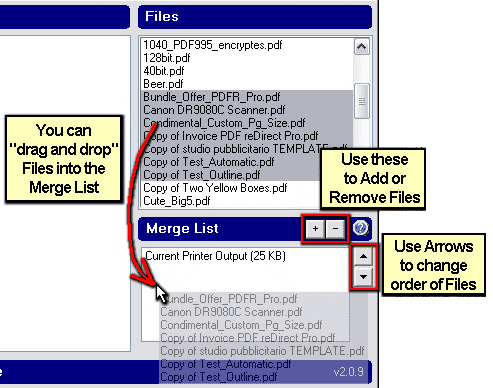 Apart from that, I am not sure what the problem could be. Please give it another try, and if the problem continues, let me know, and I will help you troublehoot further. Sample files will be useful, as well as screenshots to show me what is going on. If you do not know how to take screenshots, let me know, and I will explain how. Thanks! ------------- Michel Korwin-Szymanowski EXP Systems LLC |